Skip to content

HƯỚNG DẪN NÂNG CAO CÁCH TỐI ƯU GAME QUA BỘ LỌC PROXIFIER

  • Như các bạn đã biết trong các bài viết hướng dẫn trước đó, Proxifier là công cụ rất mạng giúp các bạn tối ưu game thông qua giao thức Socks5, ngoài cách thông thường thì nó còn hỗ trợ cả chain, ngoài nó còn tối ưu đến cả phần Port. Trong bài viết này, Admin sẽ hướng dẫn các bạn cách tìm port của game bạn chơi qua Proxifier, để từ đó ta chỉ lọc đúng cái port đó khi kết nối nhầm tăng hiệu năng lên đối đa.
    • Nếu bạn không muốn kiếm port game như hướng dẫn bên dưới, thì Admin có mẹo hay hơn giúp các bạn:
      • Ở phần port range các bạn luôn để: 1000~65535.
      • Bởi vì đa phần các game nếu có kết nối ngầm, họ thường cho client kết nối đến máy chủ của họ qua port 80 hoặc 443.
      • Với thiết lập port range trên, chắc chắn công cụ sẽ chỉ Tunnel các kết nối game.
      • Như vậy ta không cần phải quan tâm port chính của game là gì (bao lô luôn rồi).
      • Cách này cũng áp dụng tương tự cho ProxyCapSocksCap64.

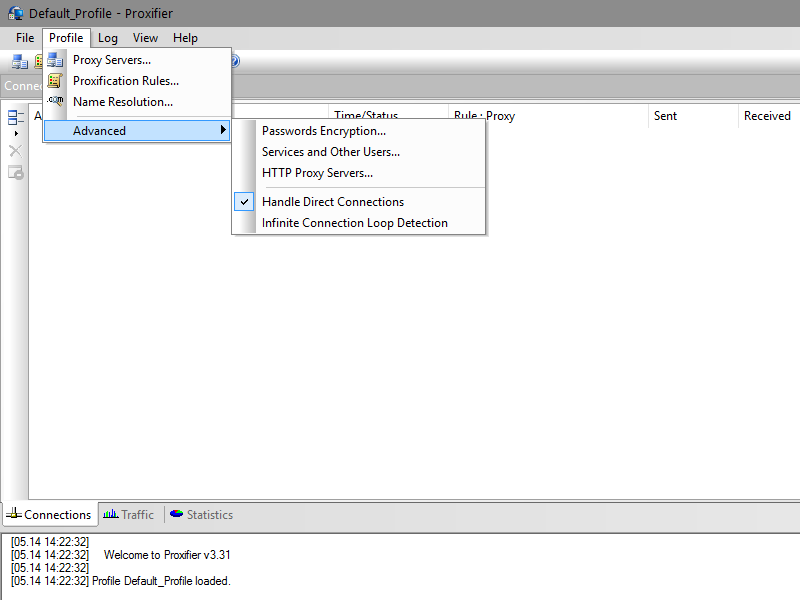
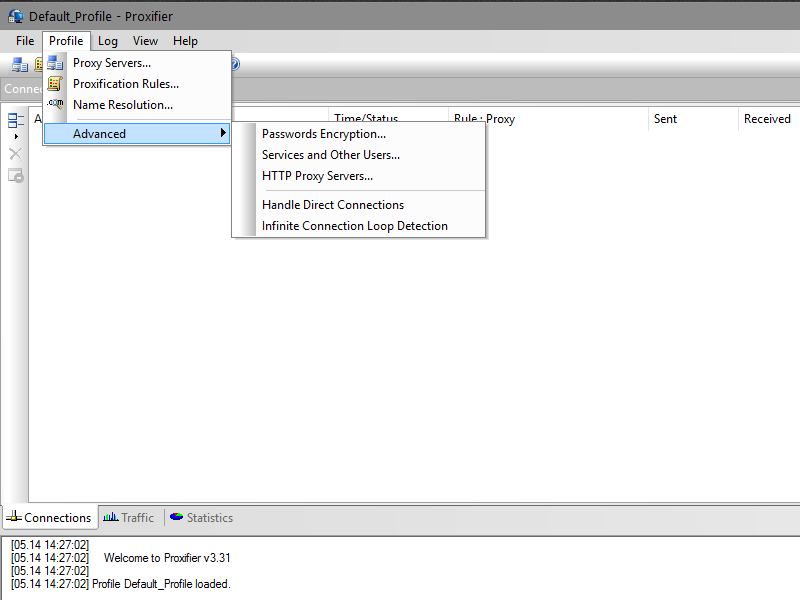
  • Đầu tiên bạn mở Proxifier và kích hoạt chế độ Handle Direct Connections.
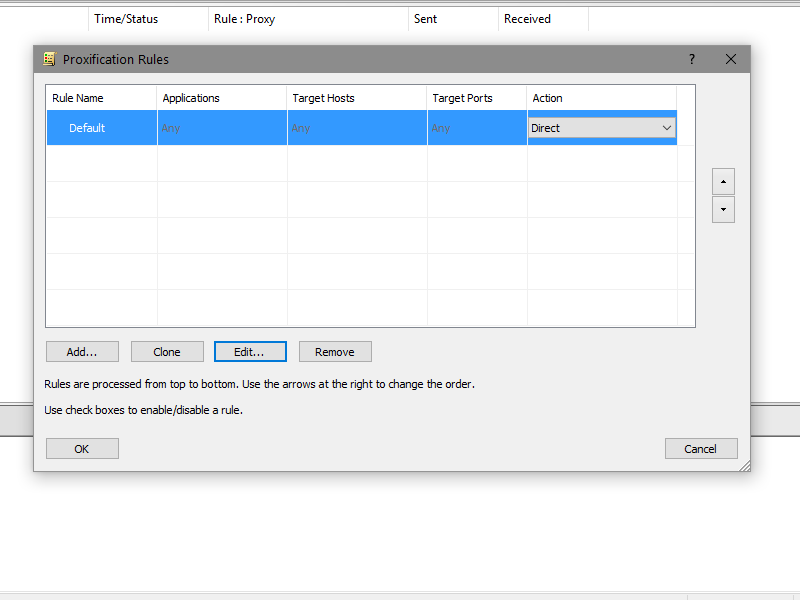
  • Sau đó nhớ thiết lập cho toàn bộ các kết nối sử dụng trực tiếp mạng của bạn (do bạn check cái ở trên thì Proxifier sẽ control hết).
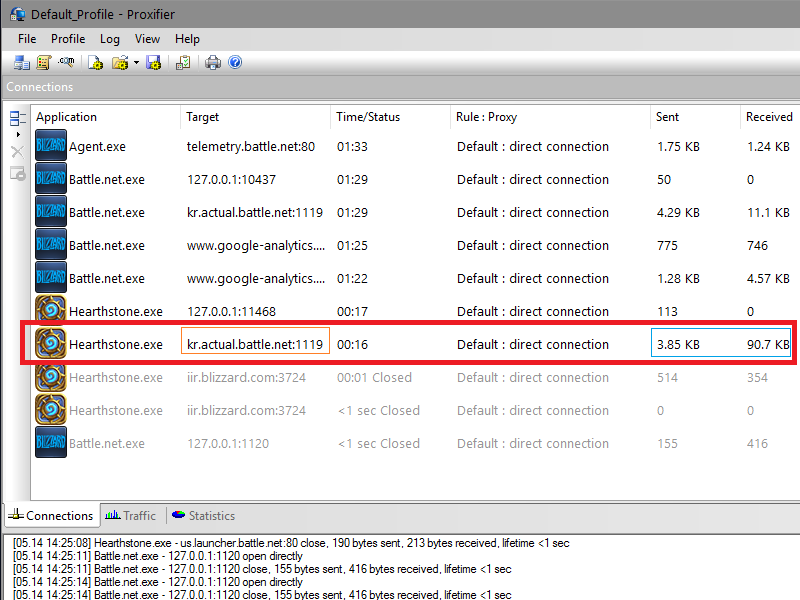
  • Sau đó bạn mở game đang chơi lên, ở đây Admin sẽ ví dụ với game Heartstone.
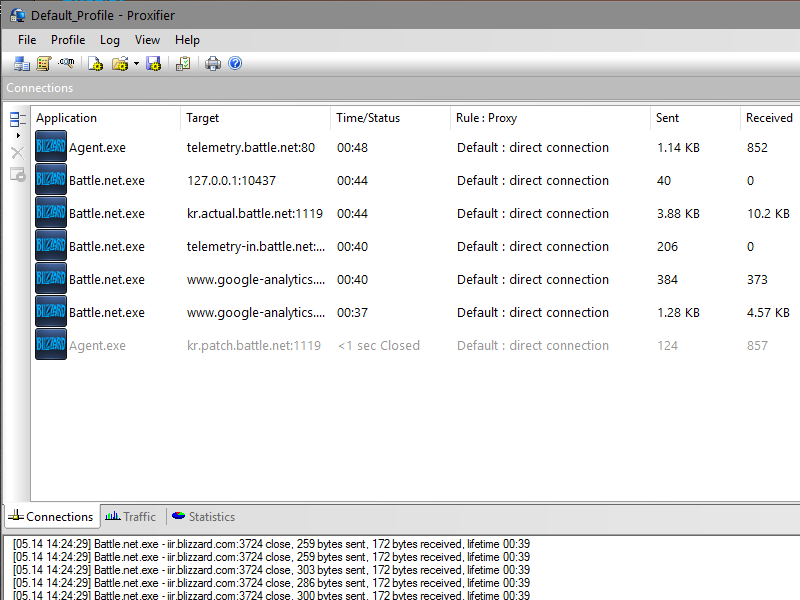
  • Sau khi vào được game, bạn có thể thấy Heartstone nó tạo rất nhiều kết nối, trong đó có một kết nối có Sent/Received nhiều nhất và có Target có vẻ chính xác là máy chủ của game Heartstone, bạn ghi nhớ cái port của nó lại (1119).
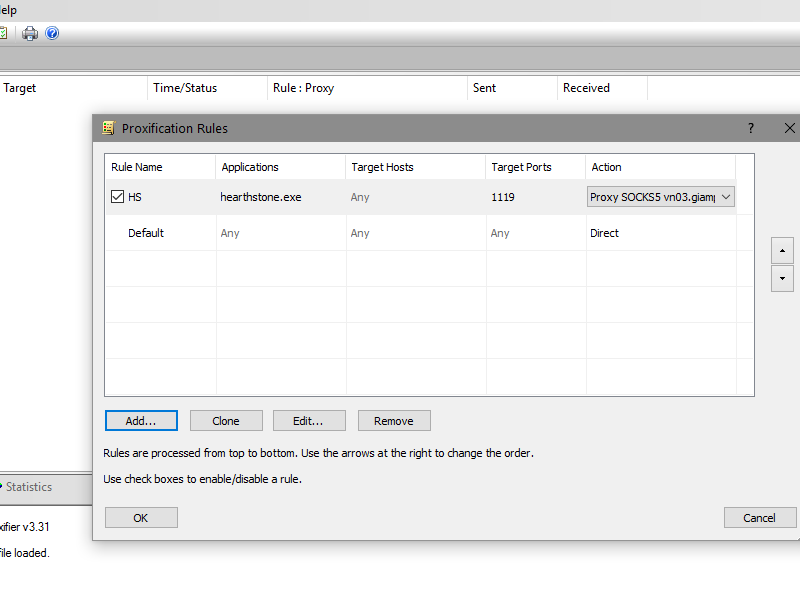
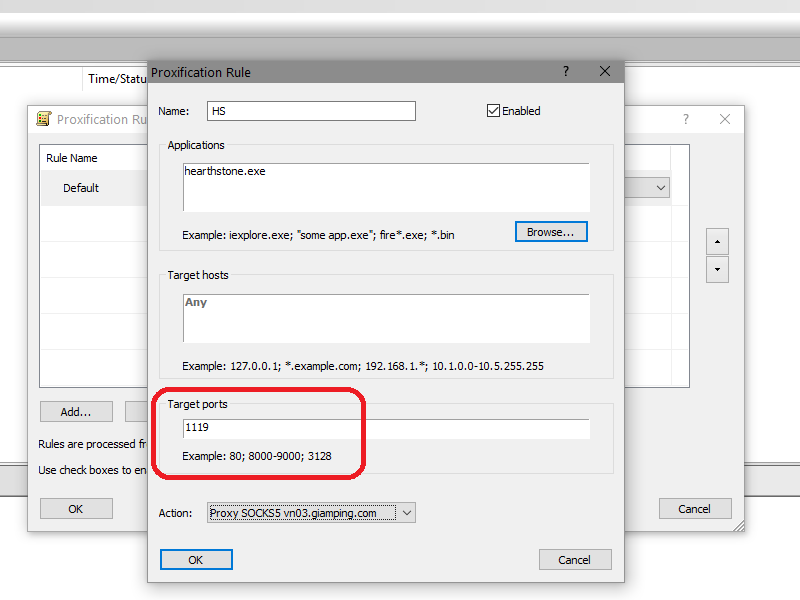
  • Sau đó ta tắt chế độ Handle Direct Connections đi và bắt đầu tạo bộ lọc chính thức cho game này.
  • Sau khi cấu hình xong giờ chỉ việc mở game chơi thôi.
 

Categories

Archives

Tags Cloud

Yulgang (1) My.com (1) Norsfell Games Inc (1) BioWare Corporation (1) Myst Online: URU Live (1) BioWare (2) Trove (1) Guilty Gear (1) Destiny (3) Ubisoft Annecy (1) Bloodline Champions (3) Fornite (1) Outriders (1) Ryzom (1) Guild Wars (7) Garena (6) Blizzard Entertainment (1) Minecraft (3) DOFUS (1) Frag Lab LLC (1) Warframe (4) Honkai: Star Rail (1) Baldur's Gate (1) EA Romania (1) Codemasters (1) Creative Assembly (2) League of Legends (15) Dragon Nest (3) Eldevin (1) Century: Age of Ashes (1) Konami (1) PlayEveryWare (1) Ubisoft Montreal (1) Conqueror's Blade (1) Fortnite (4) MIR4 (1) Call of Duty (5) Activision (3) FIFA (3) WWE (1) Dead Maze (1) Wizard101 (1) EA Canada (1) Rogue Company (1) Zenith: The Last City (1) APB Reloaded (3) Vindictus (3) Riders Republic (1) Whitemoon (1) Elyon (3) Allods Online (3) Angels Online (3) Dragon's Prophet (3) The Swordsmen X (1) DC Universe Online (3) Korea (4) Thailand (1) Champions Online (1) Tribes of Midgard (1) Genshin Impact (3) Star Trek Online (2) Priston Tale (1) Identity V (1) StarCraft (3) Wild Rift (2) Booming Games (1) Elite Dangerous (1) Terraria (1) Smilegate (1) .NET Framework (1) Hell Let Loose (1) Funcom (2) Darkfall: Rise of Agon (1) Android (34) Apex Legends (5) Atlantica (3) Twin Saga (1) LDPlayer (1) Mobile (39) Treyarch (1) Ubisoft (3) Taiwan (2) Windows (26) Dungeons & Dragons Online (2) Legends of Runeterra (1) Lineage (3) NCsoft (1) Blade & Soul (7) Elden Ring (1) Dota 2 (2) Immutable (1) Booming Tech (1) EA Vancouver (1) Dead by Daylight (1) Kakao Games Europe B.V. (1) Rockstar Games (3) Dungeon Fighter Online (1) FIFA Online (5) Heroes of Newerth (3) World of Warships (3) Revelation (1) Curve Games (1) Linux (2) Lionheart Studio (1) Wakfu (1) Puzzle Pirates (1) Battlerite (3) Risk of Rain (1) Tree of Savior (3) Three Rings Design (1) Neverwinter (3) Cửu Âm Chân Kinh (2) The Legend of Legacy (1) Secret World Legends (1) Epic Games (2) VNG (1) Panic Button Games (2) Star Conflict (1) Heroes of the Storm (3) Hellgate (1) NARAKA: BLADEPOINT (1) Vietnam (18) Blizzard (5) Pmang (1) Final Fantasy (6) Counter-Strike (5) Nimble Neuron (1) Digital Extremes (1) Last Epoch (1) WeMade (1) SOCKS5 (35) WireGuard (2) Mass Effect (1) Nexus The Kingdom (1) Teamfight Tactics (1) Proxy (4) Smite (3) EverQuest (5) China (11) Hearthstone (3) Valve (2) iOS (29) Standing Stone Games (1) Japan (1) Malaysia (1) Codeglue (1) Electronic Arts (4) Hood: Outlaws & Legends (1) The Lord of the Rings (4) Diablo (10) Derakon (1) UNDECEMBER (1) Winch Gate Property Limited (1) VALOFE (1) Rust (1) LINE GAMES Corporation (1) Ragnarok X: Next Generation (1) Yu-Gi-Oh! (1) Total War (2) Gearbox Software (2) Ultima Online (1) Raven Software (1) Phantasy Star Online (3) VPN (90) Dark Age of Camelot (1) Snail (1) Tower of Fantasy (1) Soul Saver Online (1) Twelve Sky (1) A Tale in the Desert (1) EVE Online (4) Team17 (1) Blue Mammoth Games (1) Roblox (1) Daybreak Game Company (2) Path of Exile (15) The Ascent (1) Aion (4) MU (7) MapleStory (5) Tibia (3) Ragnarok Online (7) Hopoo Games (1) ArenaNet (1) Battlefield (1) SoftEther (19) Spike Chunsoft (1) VALORANT (4) Offworld Industries (1) Beenox (1) 2K Games (2) Pipeworks Studio (1) Dark Nemesis: Infinite Quest (1) Tiny Tina's Wonderlands (1) Humankind (1) Engine Software (1) Portalus Games (1) Gods Unchained (1) Pirate101 (1) Looking Glass (1) Riot Games (1) Guild Wars 2 (1) Granado Espada (1) Lucasarts (1) Neon Giant (1) Age of Wushu (4) macOS (3) KakaoGames (2) Escape From Tarkov (3) Norsfell (1) Đột Kích (2) Warcraft (4) Rocket League (3) War Thunder (3) Salem (1) Halo (1) Mabinogi (3) Dota (1) New World (3) JX Online (7) Pirates of the Burning Sea (1) PayPal (2) VPN Gate (19) Playwing LTD (1) COGNOSPHERE Pte Ltd (1) ArcheAge (6) Rift (3) Swords of Legends Online (2) Warface (1) VTC (2) Albion Online (3) The Secret World (3) Runescape (1) Techland (1) Lost Ark (11) BANDAI NAMCO (1) Black Desert (6) Next Island (1) Crossfire (8) Nexus The Kingdom of the Winds (2) Diablo Immortal (2) Steam (3) SoulWorker (1) ACE Online (1) Conquer Online (3) Mechwarrior Online (3) Feral Interactive (1) Dragon Saga (1) Desktop (24) Heroes of Gaia (1) Nuverse (1) World of Warplanes (3) RamenVR (1) Paladins (4) Hong Kong (3) Darkfall Unholy Wars (3) Square Enix (1) 505 Mobile S.r.l (1) Double Helix Games (1) Squad (1) Tencent (3) Grinding Gear Games (1) Ring of Elysium (1) Hotta Studio (1) Shatterline (1) Re-Logic (1) Singapore (3) Riders of Icarus (1) Mail.ru (1) ODIN: Valhalla Rising (3) Scions of Fate (1) QQ (1) Hex: Shards of Fate (1) World of Tanks (6) Grand Theft Auto (4) Infinity Ward (1) Boundless (1) Spike Chunsoft Co Ltd (1) Defiance (4) Age of Conan: Unchained (1) Tera (3) PUBG (5) Focus Entertainment (1) World of Warcraft (9) Sledgehammer Games (1) Indonesia (1) Perfect World (3) Nexon (4) Black Matter Pty Ltd (1) Bioware Austin (1) The Elder Scrolls (3) Forsaken World (1) The Pride of Taern (1) MY.GAMES (1) Gearbox Publishing (2) Visual Concepts (1) Black Squad (1) Tom Clancy's (1) Needs Games (1) V Rising (1) Kakao Games (1) Amplitude Studios (1) Wurm Online (3) Overwatch (6) Eternal Return (1) DR Studios (1) Runes of Magic (1) Digimon Masters Online (1) Liên Minh Huyền Thoại (4) Sega (3) CABAL Online (5) Dying Light (1) Võ Lâm Truyền Kỳ (7) Cổ Kiếm Kỳ Đàm (2) Fallen Earth (1) Bungie Inc (1) Freestyle 2: Street Basketball (1) Midway Games (1) Honkai Impact (1) Crowfall (1) Sumo Digital (1) Sudden Attack (1) Turbine (1) Conan Exiles (2) 9Dragons (1) Amazon Game Studios (1) Gunfire Reborn (1) Aura Kingdom (3) People Can Fly (1) miHoYo (1) CSGO (2) Needs Games Inc (1) Hiệp Khách Giang Hồ (1) Cửu Long Tranh Bá (1) NoxPlayer (1) Respawn Entertainment (1) PlanetSide (3) CFQQ (1) Dark Legends (1) Bá Chủ Thế Giới (1) Star Wars (4) Brawlhalla (1) Darkpaw Games (1) WARP (1) BlueStacks (2)

Bài viết ngẫu nhiên

Hướng dẫn giảm ping giảm lag giảm delay và ổn định kết nối game PUBG Online với phần mềm GIAMPING hoặc RIPDELAY

Tải phần mềm giảm ping Tiếng Việt ở đây: https://giamping.com/phan-mem-giampingvpn/ Tải file ZIP về và giải nén ra để sử dụng (không cần cài đặt). Trong bộ phần mềm giảm
Chi tiết...

HƯỚNG DẪN CÀI ĐẶT VÀ SỬ DỤNG OPENVPN TRÊN IOS

[siteorigin_widget class=”PW_Steps”][/siteorigin_widget] [siteorigin_widget class=”PW_Steps”][/siteorigin_widget] [siteorigin_widget class=”PW_Steps”][/siteorigin_widget]
Chi tiết...

How to fix delay-lag-dis-ping-lacenty-spike issues in Rift with RIPDELAY Application easily and quickly!

Step 1 → Download RIPDELAY Application: https://ripdelay.com/download/ Step 2 → Setup RIPDELAY Application (Run file RIPDELAY_Setup.exe that you just downloaded). Step 3 → Run RIPDELAY icon on desktop. Step 4
Chi tiết...

HƯỚNG DẪN GIẢM PING GIẢM LAG GIẢM DELAY VÀ TỐI ƯU ĐỐI VỚI GAME BLADE AND SOUL VIỆT NAM (NHÀ PHÁT HÀNH GARENA) THÔNG QUA VPN HOẶC SOCKS5

Để dễ dàng hơn trong việc kiểm tra Ping mà không cần phải vào game, Admin đã dùng SmartSniff để rà chính xác IP ở của game (ở Hà Nôi):
Chi tiết...

How to fix delay-lag-dis-ping-lacenty-spike issues in MapleStory with RIPDELAY Application easily and quickly!

Step 1 → Download RIPDELAY Application: https://ripdelay.com/download/ Step 2 → Setup RIPDELAY Application (Run file RIPDELAY_Setup.exe that you just downloaded). Step 3 → Run RIPDELAY icon on desktop. Step 4
Chi tiết...

The Best Free Djibouti VPN for Desktop and Mobile

Safe, anonymous and secure Connect easily with just a few steps Browse the internet freely and undetected Select an IP from the geolocation of your choice DOWNLOAD WINDOWS APPLICATION DOWNLOAD
Chi tiết...